
Notion Task Management for Teams: 3 Proven Steps to Delegate With Confidence
Most content out there, aka Notion templates, shows only simple solutions for task delegation in Notion. It usually comes from a solopreneur perspective and rarely considers what Notion task management for teams looks like.
Working with others can quickly get messy by nature, even with the best intentions.
With a simple setup where you brainstorm tasks in a project and assign a responsible person, you still have no reliable way to know whether a task is done, or whether it is delayed because the delegatee changed the due date or removed it entirely.
Adding a Deadline property is not a complete solution either. When people see both a due date and a deadline, they may be tempted to deliver at the last minute, or change the deadline to suit their schedule.
That is a short-term view. From a delegator’s perspective, where the job is to monitor the broader scope, even small changes can create chaos in a project’s execution.
The core issue is structural: Notion has no native approval workflow. Once a task is marked done, nothing happens on the delegator’s end. The system runs on trust — which works until it doesn’t. And in a team setting, “until it doesn’t” happens more often than anyone admits.
Before implementing Notion Task Management: Coordination nightmare
One of the reasons my client wanted a project management system was due to their weekly coordination nightmare.
A project manager needs to collect figures from her team. She writes an email, gives a deadline (and maybe sets a reminder for herself in Outlook).
In the best case, most people deliver on time. But “most” is not enough. So the follow-up begins: first by email, then via WhatsApp — often in a group chat that includes everyone, including those who have already delivered.
The result is a quiet punishment for the punctual: they receive the same reminders as those who are late. Reply-all emails multiply across every inbox. The WhatsApp group becomes noise for most and loses relevancy. And the project manager spends a significant portion of her time not on steering — but chasing.
The solution we’ve built: Notion task delegation that actually works
Framing this through The Opera Model: what we uncovered here was a dysfunction on two levels — the Musician (execution had no defined endpoint) and the Conductor (steering was impossible without visibility). The solution had to address both.
We’ve built a classic project management system in Notion. Once the team started testing, a question quickly surfaced: who owns the Due Date — and who owns the Deadline?
It became apparent that the setup needed to better accommodate Notion task delegation in a team context — not just assignment, but ownership, visibility, and closure.
This is a solution we built in a recent client project:
- We use two properties: Due Date and Deadline
- We hide the Deadline property from all views and from the page
- We add conditional formatting so that as soon as Due Date and Deadline conflict (the same day or later), the record turns orange
- The Status property has two types of Done. One is the default for all users, and the second is for the delegatee to confirm completion. We used the expressions Done and Done_Approved
- On the “My Home” dashboard, we have two sections: “My Work” and “Working with others”. In the latter, we have a view called “My Delegated Work”
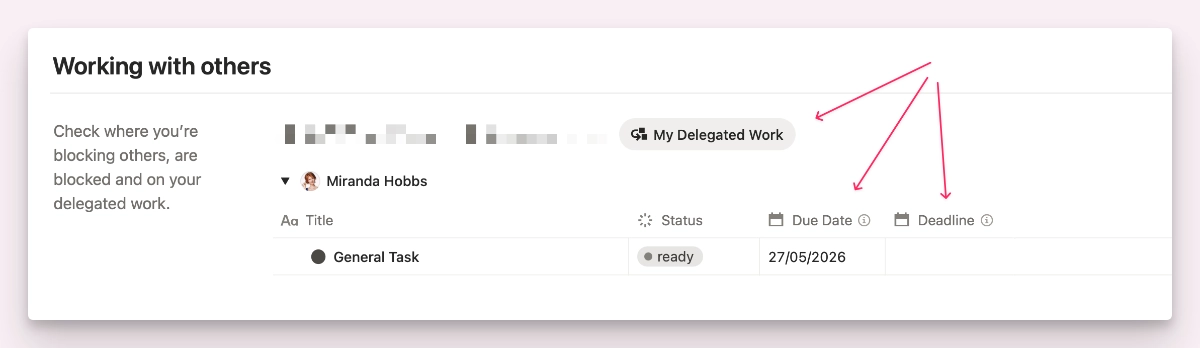
Why use Due Date and Deadline properties
The Due Date property gives the user planning flexibility so they can fit a single task into their overall workload.
The Deadline property is the ultimate delivery date. I recommend defining it as the latest date the delegatee can deliver. With that in mind, the delegator plans backwards from the deadline, adds a buffer, and dates the due date earlier.
You could also model this with dependencies, but I do not recommend it. If the delegatee changes dates, it shifts subsequent dates and disrupts the delegator’s planning.
Why use two types of Done in the Status property
What many people overlook is that Notion task management for teams needs to support different perspectives. A delegatee focuses on a narrow scope, while a delegator has to maintain the full picture.
So the system should accommodate both perspectives, rather than creating competition.
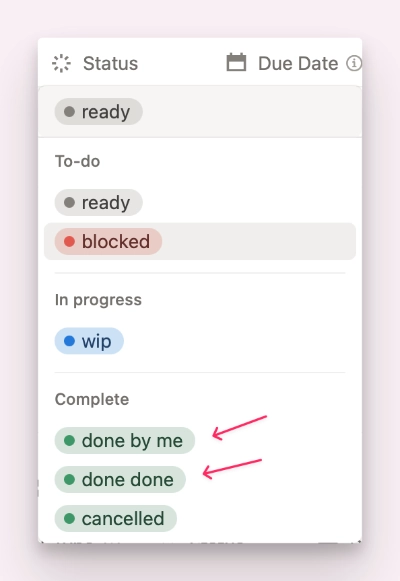
Several stages of Done to accomodate different perspectives.
What can’t be solved right away
Not everything can be solved with structure alone. People “not behaving” is a layer of operational dysfunction.
Solving this type of team dynamics requires a layered approach — first the right structures, then shared guidelines, then behaviour can be addressed.
The improvement for the client
Let’s recall the situation before we implemented Notion task management for the team: tasks were sent as emails and every project was managed in a separate Word file.
Not only did the task delegation by email create redundancies and full inboxes, they were also very short term. Because let’s be honest here for a second: tasks sent well in advance get ignored.
The difference in one sentence: Before, the coordination burden lands in everyone’s inbox. After, it lives in the system — visible, manageable, and without collateral damage to those who delivered on time.
With the new setup the project owner can plan the entire life-cycle of a project, create tasks well in advance, setting due dates and deadlines.
The assignee will see their task depending on the view they’ve chosen to look at: Just the tasks for today, all open tasks, open tasks of next week, and even an Overdue view.
The assigner can switch between a project view overseeing all tasks of that project or all delegated tasks regardless of the project.
Why this works
It works because we’ve created the structures and the dashboards that allow to accommodate different user roles and needs depending on their current work focus (execution or planning).
Notion’s flexibility is both its strength and its reputation problem. Implemented right, it becomes a sharp tool for everyone.
But “implemented right” means more than knowing the tool — it means understanding different user needs, balancing messy team dynamics, and noticing operational dysfunction before it becomes a bottleneck.
That’s the role of an experienced Business System Consultant who is also a Certified Notion Consultant — with 30+ years of experience solving operational dysfunction across different roles and industries (and Notion Certified since 2021).
The next step: A deeper self-assessment
Turn your rough self-diagnosis into a sharper and company-wide assessment.
Why we work the way we work — The System Transformation
This practical example of Notion task management for teams shows that it’s not only about downloading a template or quickly building a few databases with Notion AI.
What most teams need is a sparring and accountability partner. One that notices operational dysfunction, addresses it head on, gets to the bottom of it and finds a solution that works for different stakeholders.
And that’s why my service is called The System Transformation and isn’t done in 8 weeks or so — because uncovering those challenges takes time. Only with a layered approach, peeling off old wallpapers, we get deeper into the operational challenges and can uncover them with the necessary depth and detail.
Because nuances like a missing feedback loop only become visible once the basic structure exists — and you actually start working with it.
Off-the-shelf templates solve generic problems. The System Transformation solves your problem. That is the difference.
FAQ
Does Notion have a native task delegation feature?
No. Notion has no built-in delegation or approval workflow. You can assign tasks to people, but once a task is marked done, nothing happens on the delegator’s end. Notion task management for teams requires additional properties, custom views, and a two-stage status workflow to close that gap.
How do you track delegated tasks in Notion without micromanaging?
The key is a dedicated Delegator View — a filtered view that shows only the tasks you have delegated, to whom, and their current status. This is one of the core components of Notion task management for teams that most templates overlook. Combined with conditional formatting that flags due date and deadline conflicts in orange, the delegator gets full visibility at a glance without having to chase anyone.
What is the difference between a Due Date and a Deadline in Notion task management?
The Due Date belongs to the assignee — it gives them planning flexibility to fit the task into their workload. The Deadline belongs to the delegator — it is the ultimate, non-negotiable delivery date. In a well-built Notion task management for teams setup, the Deadline is hidden from the assignee’s default views to avoid last-minute delivery behaviour, while the delegator plans backwards from it and sets the Due Date with a buffer.